Reading the docs…
Stopped.
Widgets are live views on the board: searches and summaries that keep themselves up to date, and whose rows you can drag out as cards.
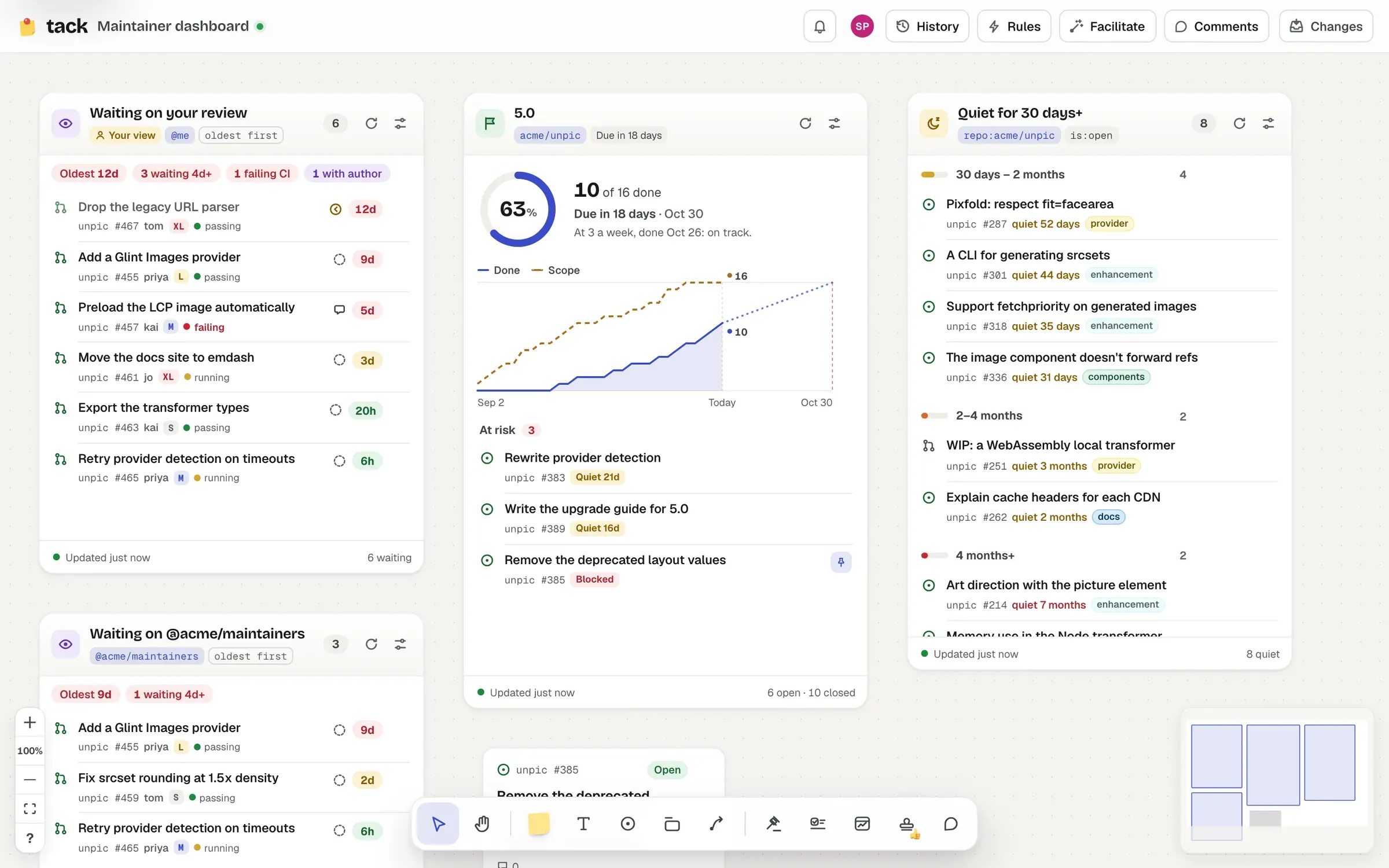
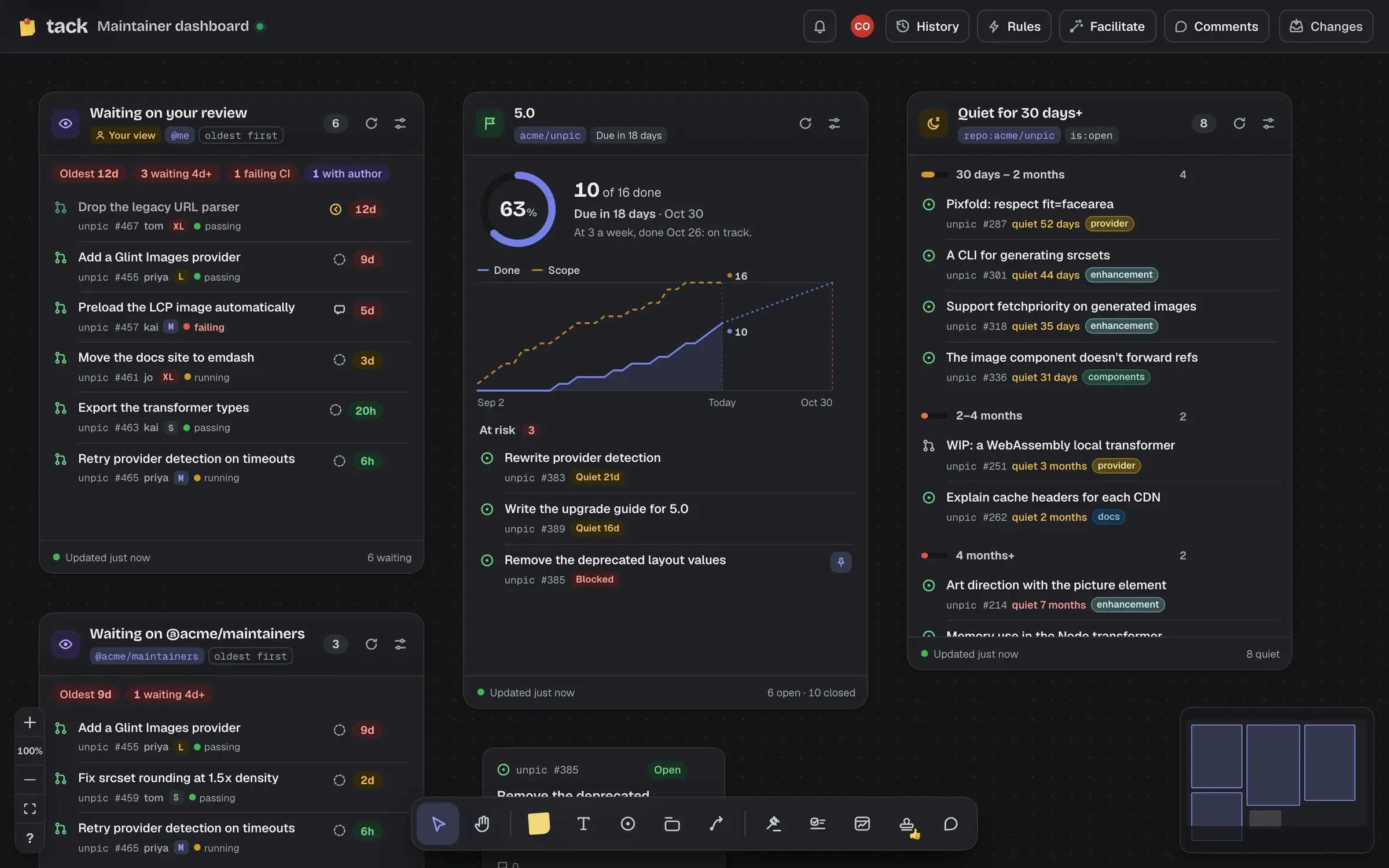
Press W (or Widget in the toolbar) to open the picker. Click a kind to add it in the nearest free space to the middle of the view, so it doesn’t land on top of what’s there, or drag it onto the board to put it exactly where you drop it. Clicking the board with the widget tool adds a blank list there.
Where the instance has AI on, you can describe the widget you want instead, in Ask for one at the top of the picker: it’s set up for you and previewed, live, before you place it.
The picker also has Quick lists for owner/name, searches over the board’s busiest repository (the one with the most cards): “Open bugs”, “Needs triage”, “Open pull requests”, “Good first issues”, “Unanswered questions” (the repository’s discussions waiting for an answer), “Top ideas” (its most upvoted ideas, when it has an Ideas category; “Top discussions” otherwise), “Recent announcements” (when it has an Announcements category), “Assigned to me” and “My review queue”. Inboxes and rules offer the same searches under the same names, except “Top ideas” and “Top discussions”, which are only an order.
A board is shared, so when you’re signed in, “Assigned to me” and “My review queue” are added for you by name (“Assigned to alice”, assignee:alice): everyone sees the same list when you say “look at the review queue”. A widget that still searches @me shows each person their own results, and says so with a Your view badge.
The gear in a widget’s header opens its settings beside it, on whichever side has room, and kept on screen. The panel helps with the search: one in plain words, or one with no repository, gets a suggestion of what it probably meant (“Did you mean repo:acme/unpic label:bug?”, from the board’s repository and its labels), one click to use. A Forge choice only appears when the board has items on more than one. Searches and text apply when you press Enter or leave the field, since each change runs the widget’s searches again for everyone. Settings changes are undoable, like any other edit. Done or Esc closes the panel.
Select a widget to resize it from its edges and corners (at least 260 × 200). Pick it up by its header to move it. Zoomed out, each widget shows one big number.
Every setting of every kind is in its reference page, generated from the widget’s schema.
A widget’s searches run as whoever’s looking at it. Two people looking at the same widget can see different rows.
@me means you. Your results only go to you.is:public), and anything not known to be public is dropped. @me means nothing: “Sign in to see what “@me” means for you.”repo:, org: or user: run again on any delivery the board hears about. These refreshes wait a couple of seconds for more news, and never run a search more than once every ten seconds. Repositories without the app send no webhooks, so widgets over them refresh on the schedule.Results are shared: two tabs, or two widgets with the same search, cost one search. If a refresh fails, the widget keeps showing what it had: “Updated 10 min ago · couldn’t refresh”, with Retry.
GitHub limits how often anyone can search, so each board keeps well inside: at most 20 searches and 60 other reads a minute for each person (people who aren’t signed in share one allowance). If a board needs more, its widgets wait: “Lots of searches on this board just now: trying again in a moment.” If GitHub itself says to slow down, the widget says when it’ll try again.
GitHub only searches up to 256 characters, and Tack adds a sort (and is:public for people who aren’t signed in), so keep searches comfortably shorter than that.
Rows in every widget drag out onto the board as cards, or click one (or press Enter on it) to put its card beside the widget. The row stays, and the card remembers it came from the widget (see Where cards come from). A pin marks rows whose item is already on the board; point at a row and its card lights up, and the other way round.