Reading the docs…
Stopped.
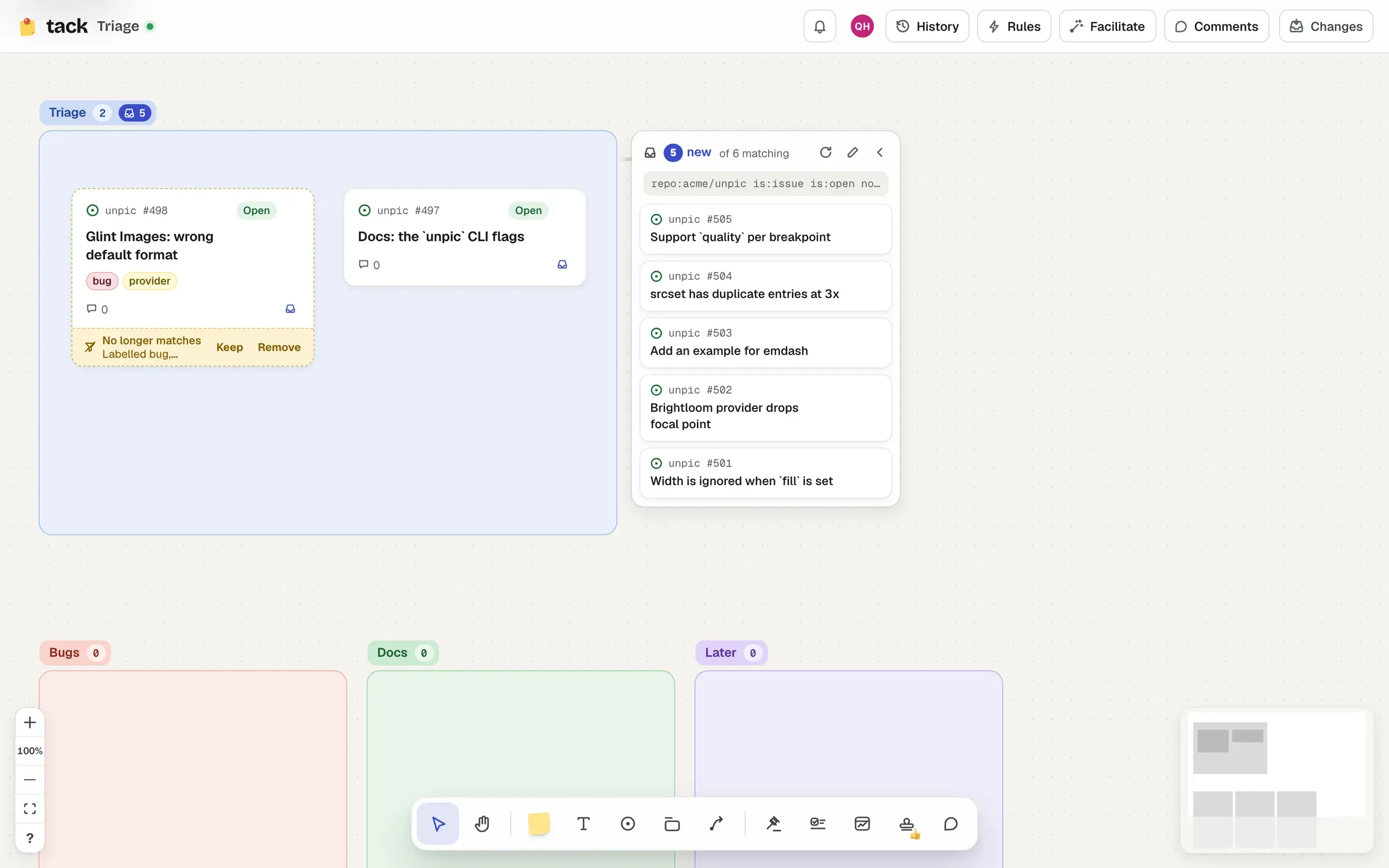
An inbox is a section bound to a search. New matches wait in a tray beside it, marked new, until someone sorts them onto the board or dismisses them. Automation never rearranges the board: people do the sorting.
Select a section on its own and choose Inbox in its bar. Write a search, as on GitHub, such as repo:owner/name is:issue is:open no:label, or start from one of the ready-made searches lists use too:
label:docs), it’s the first ideais:open label:bugis:issue is:open no:labelis:pr is:openis:open label:"good first issue"As you type, it counts the matches (“14 matches now”), searching as you. A search in plain words gets a suggestion of what it probably meant, as in a list’s settings (see Lists). If another inbox on the board already collects some of the same items, the editor says so (““Triage” already collects 5 of these”): each item then waits in just one tray, the one with the narrower search (fewer matches), so nobody sorts it twice.
Tick Place new matches straight in to skip the tray: Tack adds a rule that puts new matches into the section as they arrive. Leave it off to review them first. (It needs a repo: in the search, as rules do.)
Start collecting turns the section into an inbox. To change the search later, choose Edit query in the tray; Stop collecting turns it back into a plain section, and removes the rule if it was placing matches straight in.
Any GitHub search works: see Search syntax.
The tray sits beside the section and moves with it: on the right, or on the left if something’s in the way, and never over another section. With no room either side, or when you zoom far out, it folds into a pill on the section’s title (“3 new”), so it doesn’t cover the board; click the pill to open it anyway. It’s folded for people with view access, too. Fold the tray away folds it yourself.
The tray shows how many are new, how many match in all (“2 new of 6 matching”; point at it for the rest: on the board, dismissed, or in another inbox), and the search. Items waiting in another inbox’s tray instead are noted at the bottom (“2 more wait in “Docs””).
The tray lists matches that aren’t on the board anywhere and haven’t been dismissed, newest first. Ones that arrive while you’re watching slide in, marked New.
To sort an item:
Cards sorted out of an inbox remember where they came from (see Where cards come from).
People with view access can see the tray and refresh it, but not sort or dismiss.
Like a widget, an inbox searches as whoever’s looking, with their own GitHub account, so two people may see different trays. People who aren’t signed in only see public items.
It refreshes every minute while someone’s looking, when GitHub says a repository it searches has changed, and on Check for new matches.