# Custom widgets
> Your own JavaScript on the board, in a sandbox, drawing the board's data through a small read-only API.
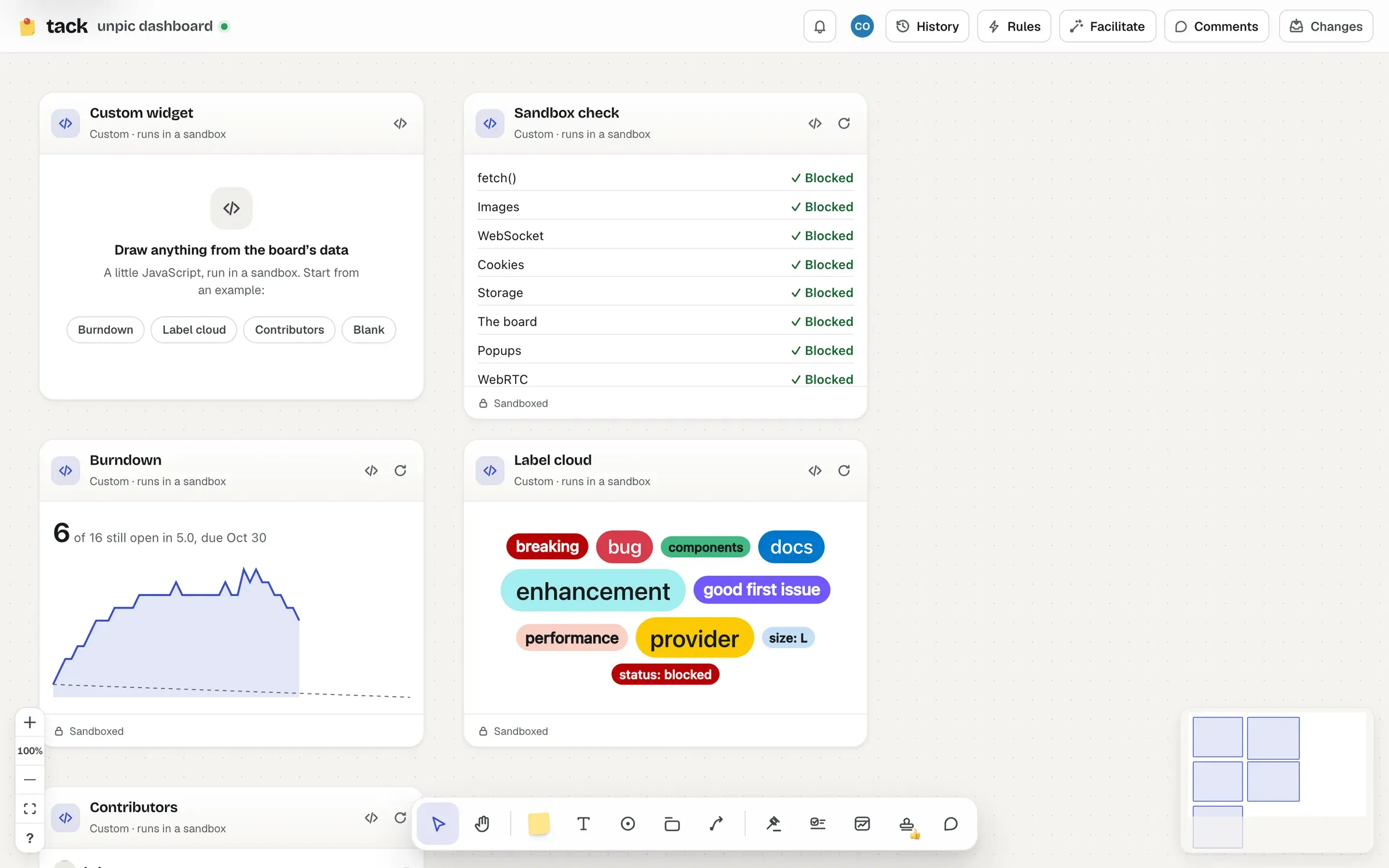
A custom widget is a little JavaScript that draws whatever you like from the board’s data: a burndown, a label cloud, who’s contributing. Its code runs in a sandbox that can’t reach the network, Tack, or anything else on the page, and it reads data through a small API that can search and read cards, but never change anything.
## Turning them on
Custom widgets are **off on every board** until its owner turns them on: **Board menu → Custom widgets…**, then **Run custom widgets on this board**. While they’re off, a custom widget on the board shows “Custom widgets are off here” and nothing runs. Turning them off again stops every custom widget on the board at once, for everyone looking.
> **Only turn this on if you trust everyone who can edit the board**
>
> A widget reads with the permissions of **whoever’s looking at it**, private repositories they can read included. Someone who can edit the board could write a widget that reads what other people can see and tries to get it out. The sandbox closes every way browsers let it, but no sandbox is perfect: see [what the sandbox does](https://tack.social/widgets/custom.md#what-the-sandbox-does).
## Writing one
Add one from the widget picker (`W`; it’s only there on boards with custom widgets on, and for their owners), then start from an example (**Burndown**, **Label cloud**, **Contributors**) or a blank one. The code button in its header opens the editor:
- **Code**: a module script, run once when the widget starts. Top-level `await` works.
- **Settings**: JSON your code reads as `tack.config`, so one widget’s code can serve several searches. Settings that aren’t a JSON object can’t be applied.
- **Examples**: the gallery, filled in with the board’s busiest repository.
- **Preview**: runs your draft in its own sandbox a moment after you stop typing (or press **Run**), with a console underneath that shows what it logged and threw.
Nothing reaches the board until you press **Apply** (`⌘` `Enter`), which is one undoable change. People who can only view the board can read the code, but not change it.
On the board, a custom widget only takes the pointer once it’s selected, so the board pans and selects around it as usual. Its footer counts the errors its code has thrown; click it to open the editor.
## The API
The code gets a global `tack`:
| | |
| -------------------------------- | ------------------------------------------------------------------------------------------------------------------------------------------------------------------------------------------------------------------------------------------------------------------------------------------------------------------------------------------------------------------- |
| `tack.config` | The widget’s settings, parsed (frozen). |
| `tack.widget` | `{ id, title }`. |
| `tack.search(q, options?)` | A GitHub issue search, like a [list’s](https://tack.social/widgets/list.md), run with the permissions of whoever’s looking. Resolves to `{ total, items, incomplete }`, where `items` are cards. Options: `limit` (at most 100), `sort` (`updated`, `created`, `comments`, `reactions`, or `top`: the most upvoted discussions), `order` (`asc` or `desc`), `host`. |
| `tack.cards(keys)` | Cards by key (`github.com/owner/name#12`), as the board has them for this person: `null` for any it doesn’t have, or they can’t read. At most 100 at once. |
| `tack.avatar(url, size?)` | A GitHub avatar (from `avatars.githubusercontent.com` only), as a `data:` URL to put in an `![]() `. |
| `tack.onUpdate(fn)` | Calls `fn` when something it searched for has new results (searches stay live and refresh like any widget’s). Returns a function that stops it. |
| `tack.theme`, `tack.onTheme(fn)` | `{ mode, motion }`: light or dark, and how much to scale durations by (near 0 with reduced motion). |
Errors from `tack` are `TackError`s, with a `reason` (`invalid`, `no_access`, `rate_limited`, `timeout`, `signed_out`…) and a `message` fit to show.
A card has `key`, `repo`, `item` (`#12`), `kind` (`issue` or `pull`), `title`, `state`, `labels` (`{ name, color }`), `assignees` and `author` (`{ login, avatarUrl }`), `comments`, `reactions`, `url`, `createdAt`, `updatedAt`, `closedAt`, `milestone` (`{ title, dueOn }`) and, for pull requests, `pull` (reviews and checks).
The page starts with the board’s look: its type, and its colours as CSS custom properties that follow light and dark mode (`var(--ink)`, `--muted`, `--surface`, `--line`, `--accent`, `--open`, `--closed`, `--merged`, `--pass`, `--fail` and more), plus `--motion` to scale animations by. `.muted` and `.empty` are there for quiet text and empty states.
```js
// Open items per label, live.
const { items } = await tack.search(tack.config.query);
const counts = Object.groupBy(
items.flatMap((item) => item.labels),
(label) => label.name,
);
document.body.innerHTML = Object.entries(counts)
.map(([name, labels]) => `
`. |
| `tack.onUpdate(fn)` | Calls `fn` when something it searched for has new results (searches stay live and refresh like any widget’s). Returns a function that stops it. |
| `tack.theme`, `tack.onTheme(fn)` | `{ mode, motion }`: light or dark, and how much to scale durations by (near 0 with reduced motion). |
Errors from `tack` are `TackError`s, with a `reason` (`invalid`, `no_access`, `rate_limited`, `timeout`, `signed_out`…) and a `message` fit to show.
A card has `key`, `repo`, `item` (`#12`), `kind` (`issue` or `pull`), `title`, `state`, `labels` (`{ name, color }`), `assignees` and `author` (`{ login, avatarUrl }`), `comments`, `reactions`, `url`, `createdAt`, `updatedAt`, `closedAt`, `milestone` (`{ title, dueOn }`) and, for pull requests, `pull` (reviews and checks).
The page starts with the board’s look: its type, and its colours as CSS custom properties that follow light and dark mode (`var(--ink)`, `--muted`, `--surface`, `--line`, `--accent`, `--open`, `--closed`, `--merged`, `--pass`, `--fail` and more), plus `--motion` to scale animations by. `.muted` and `.empty` are there for quiet text and empty states.
```js
// Open items per label, live.
const { items } = await tack.search(tack.config.query);
const counts = Object.groupBy(
items.flatMap((item) => item.labels),
(label) => label.name,
);
document.body.innerHTML = Object.entries(counts)
.map(([name, labels]) => `${name}: ${labels.length}
`)
.join("");
```
(Writing HTML from data with `innerHTML` is fine here: whatever it runs runs in the sandbox, with nothing to reach.)
### Limits
- Code up to 64 KB, settings up to 8 KB.
- 8 live searches per widget; asking for more drops the oldest.
- 120 requests a minute, 8 waiting at once, each answered within 20 seconds or failed with `timeout`.
- 64 avatars per widget.
- The sandbox must start within 8 seconds.
- **A loop that keeps going for more than a second without a pause is stopped**, and the error says which line. Loops that wait (`await` on a timer, say) are fine.
- A widget that stops answering for 6 seconds is stopped, with **Run again**.
Custom widgets’ searches refresh every 5 minutes while they’re on screen, and when GitHub says something changed in a repository they search.
## What the sandbox does
Each widget runs in an iframe with `sandbox="allow-scripts"` and nothing else, loading a page Tack serves with a policy that loads nothing from anywhere. So its code:
- can’t make requests: no `fetch`, WebSockets, images, fonts, frames or forms from anywhere but `data:` and `blob:`, and WebRTC is taken away;
- runs in an origin of its own: no cookies, no storage, no way into Tack’s page or your session;
- can’t open windows, navigate the board, show dialogs, or download anything;
- can’t navigate its own frame anywhere but Tack, and Tack’s pages refuse to be framed;
- only talks to the board through messages the board checks, answered with what the person looking may read.
What’s left, honestly: a widget sees what the person looking can see, and browsers have side channels no policy closes (timing, say, or DNS prefetching in some browsers). That’s why it’s the owner’s choice, per board, and off by default. The full threat model is in [the security review](https://github.com/ascorbic/tack/blob/main/docs/security-review.md).